Every Windows (XP and Vista) users might know that after installing a new software, the personalized Start Menu will highlight these newly installed programs with a notification. For those who don’t like this annoying notification of newly installed program feature, it’s possible to disable and turn off the kind of menu personalization.
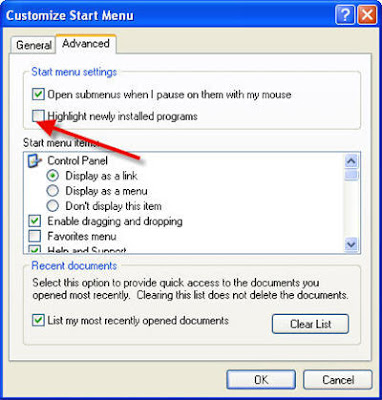
To turn off and disable the highlighting of new program in Windows XP, right click on Start button, and then select Properties. Click on Start Menu tab - ‘Customize’ button - Advanced tab, and then uncheck the box for Highlight newly installed programs option. Click OK button.
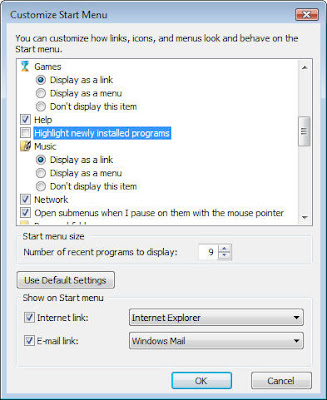 In Windows Vista, click on Start button – Start Menu -Customize button and un check the check box for Highlight newly installed programs option.
To turn off and disable the highlighting of new program in Windows XP, right click on Start button, and then select Properties. Click on Start Menu tab - ‘Customize’ button - Advanced tab, and then uncheck the box for Highlight newly installed programs option. Click OK button.
In Windows Vista, click on Start button – Start Menu -Customize button and un check the check box for Highlight newly installed programs option.
Comments
Post a Comment
Please leave your valuable comment below