 Nowadays malware are takes advanced technologies to hide their presence from virus scanners. For example, being well masked, they dodge firewalls and virus scanners, they use hidden ADS to infect a computer (ADS - Alternate Data Stream - is a good method to hide data which is attached to a regular file or directory. So, it is a great place for malware to hide), etc. This type of malware is known as Rootkit (programs, including viruses, spyware, and Trojans), which enable administrator-level access to a computer or a network system.
 This dangerous programs monitors traffic and keystrokes and make a backdoor into the system for the hacker's use. Rootkits are often hiding their presence from virus scanners, so, only a scanner specialized in this type of malware can help.
Here is a good program, Radix Anti-rootkit that uses sophisticated methodologies and removes pests and manipulated drivers, system files and processes from your system.
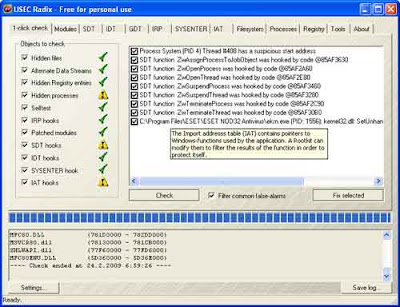
How to use it? Download Radix Anti-rootkit (free, 162Kb), unzip and run it from a USB stick (so windows file protection doesn’t get in the way of the tool). Check all options under ‘1-click Check’ tab. Ignore all warning messages (it is advisable to back up the registry before doing anything, because in some exceptional cases it result in a malfunctioning system)
Now click on ‘Check’ button for scanning. It will take some time to finish the scanning. After all tests complete, select all to fix the problem. After all, the program will display a list of files that have been repaired and modified.
thanks for the info
ReplyDelete