 Promptu is a very easy to use application launcher aimed as a strong competitor to other programs like SlickRun and Launchy.
 With Promptu, you can say goodbye to repetitive, time-consuming tasks, like hunting through your programs, folders, files, and bookmarks for the ones you need. It will certainly increase your productivity by saving time.

The program is very simple to use. After installation, create a profile. Then, from the setup menu (right click on the Promptu taskbar icon and select Setup) you can create shortcut key to launch prompt (default key is Ctrl + Q), change its appearance and can add your own items to your profile.
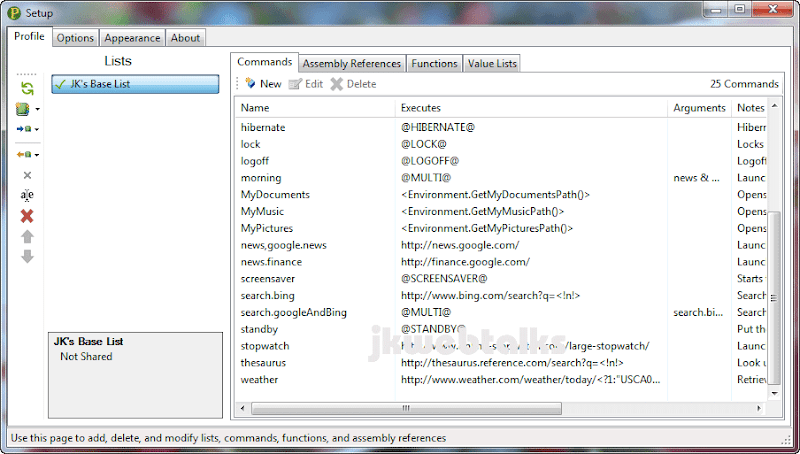
To add a new item, click on the Commands tab (see screen shot) and click new. New command editor windows will popup.
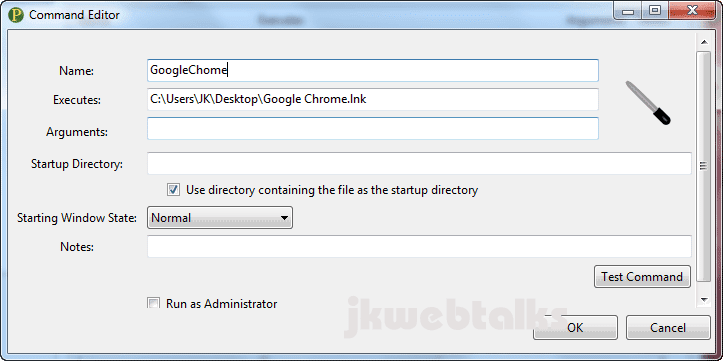
Now enter a name in the Name field (see screen shot). In the execute field enter the application path. To do that, you only need to click once the program, file or folder icon and click OK to save.
Download Promptu Launcher for Windows 7, Vista and XP (required .Net Framework 2 for XP).
Comments
Post a Comment
Please leave your valuable comment below